
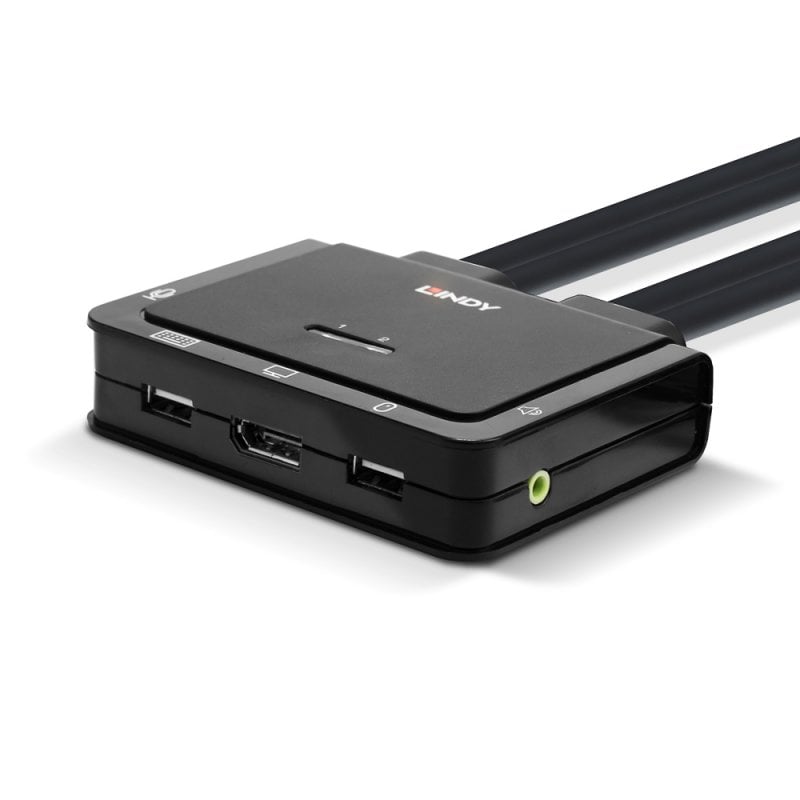
2 Port DisplayPort 1.2, USB 2.0 & Audio Cable KVM Switch

Part No: 42344
  • £182.02
14 In Stock Now   |  
Loading...

Product Summary

  • Control two DisplayPort equipped PCs from a single keyboard, mouse and monitor
  • Switch via the unit’s push button control, software or keyboard hot keys
  • Supports DisplayPort 1.2 signals, up to 4K 60Hz
  • Integrated cables for quick, hassle-free installation
  • 2 Year Warranty

The Lindy 2 Port DisplayPort 1.2, USB 2.0 & Audio KVM Switch is a compact solution for providing access and control over two DP equipped PCs from a single keyboard, mouse and monitor. With integrated cables, this switch can be easily connected directly to the system, with no need for purchasing additional cables and saving time on the installation.

Support for resolutions up to 4K Ultra HD 60Hz ensures the optimum image quality, perfect for high graphical content in gaming setups, video editing or dual system control workstations. The audio output port on the main unit also allow users to connect headphones or speakers to add immersive 2CH audio and a microphone, while additional USB peripherals can be integrated with a USB hub.

The KVM switch features multiple switching options including  a push button control (with 1.5m cable), hotkey and software switching to provide simple, reliable control for the user, great for both professional and first time users.

Please note: Software control & hotkey switching are not currently compatible with devices supporting macOS 10.15. This is due to an incompatibility between macOS 10.15 and 32-bit software.

Specifications

  • AV Interface: DisplayPort
  • Console Interfaces: USB
  • Interface Standard: DisplayPort 1.2, USB 2.0
  • Maximum Resolution: 4096x2160@60Hz 4:4:4 8bit
  • HDCP Support: HDCP 1.4
  • Supported Audio: Analogue Stereo
  • Separate Audio Ports: 2 x 3.5mm (Female)
  • Serial Interface: -
  • Console Number: 1
  • Max Number PC/Server: 2
  • Cascadable: -
  • Switching Method: Push Button, Hotkey Switching & Software
  • 19" Rack Mountable: -
  • Special Features: Supports USB 2.0 Hubs And Device Sharing, Active LED Indicators

Connectors

  • Console Interfaces: DisplayPort (Female), USB 2.0 Type A (Female), 2 x 3.5mm (Female)
  • PC/Server Interfaces: 2 x DisplayPort (Male), USB 2.0 Type A (Male), 2 x 3.5mm (Male) 1.2m Integrated Cables
  • Other Interfaces: -
  • Power: -

Physical Properties

  • Dimensions (approx.) WxDxH: 97x25x82.18mm (3.82x0.98x3.24in)
  • Housing Material: Plastic
  • Net Weight: 0.433kg (0.95lb)
  • Operating Temperature: 0°C - 40°C (32°F - 104°F)
  • Storage Temperature: -20°C - 60°C (-4°F - 140°F)
  • Humidity: 0 - 90% RH (non-condensing)
  • Power Requirements: 5V
  • Colour: Black

Miscellaneous

  • Packaging Type: Carton Box
  • Packaging Dimensions: 160x60x250mm (6.3x2.36x9.84in)
  • Gross Weight: 0.514kg (1.13lb)
  • Warranty (Years): 2
  • Certified: CE, UKCA, FCC, RoHS, REACH & California Proposition 65

Package Contents

  • DisplayPort KVM switch
  • Lindy Manual

Purchasing Information

  • No.: 42344
  • EAN: 4002888423441
Showing our 1 review for 2 Port DisplayPort 1.2, USB 2.0 & Audio Cable KVM Switch. Write a review
Review Summary - 5 out of 5 based on 1 rating.
December 8, 2020 | Trev UK
Compact and efficient

Replaced a StarTech DVI KVM for this as I purchased a new 27" monitor that would not get max Resolution through DVI, but would using the Display-Port, hence purchase of a new switch.
As I only have two PCs to use the one Monitor I went for this unit because of its compactness, reasonable price and had necessary cables fitted.
First impressions were that the unit is well-made and solid.
Installing was a doddle, the only glitch I hit was that because my new Monitor has speakers Windows sent the sound to the monitor not to my speakers that were plugged into the switch.
A quick 'set as default' for the speakers in Windows 10 and all was well again.
I particularly like the small button switch to switch between the PCs along with the keyboard switching method, switching takes 2 - 3 secs during which the monitor goes blank.
I am using an HP Wireless keyboard/mouse combo and the wireless receiver is plugged into the Keyboard USB on the switch and both keyboard and mouse are working perfectly.
Overall I am very pleased with the switch which is ideal if you only have two PCs to share one monitor.

Lindy International Ltd.